


For those who use Safari on either an iPad or a Mac, do you still miss that compact tab bar interface? I’ve got good news for you because the first developer betas of macOS Tahoe 26.4 and iPadOS 26.4 finally bring back that option that everyone else has been fussing about. We’ve often seen times when features would get removed and brought back later or interfaces would get redesigned and reverted later (e.g. Photos app) based on customers’ outcry. For example, iPadOS 26 brought out a new multitasking interface, but initially dropped Slide Over and Split View until Apple brought those two features back in later updates of iPadOS 26.
With this week’s initial betas, users will finally be able to choose that compact tab bar option by going to the System Settings app on Mac or to the Settings app on iPad.
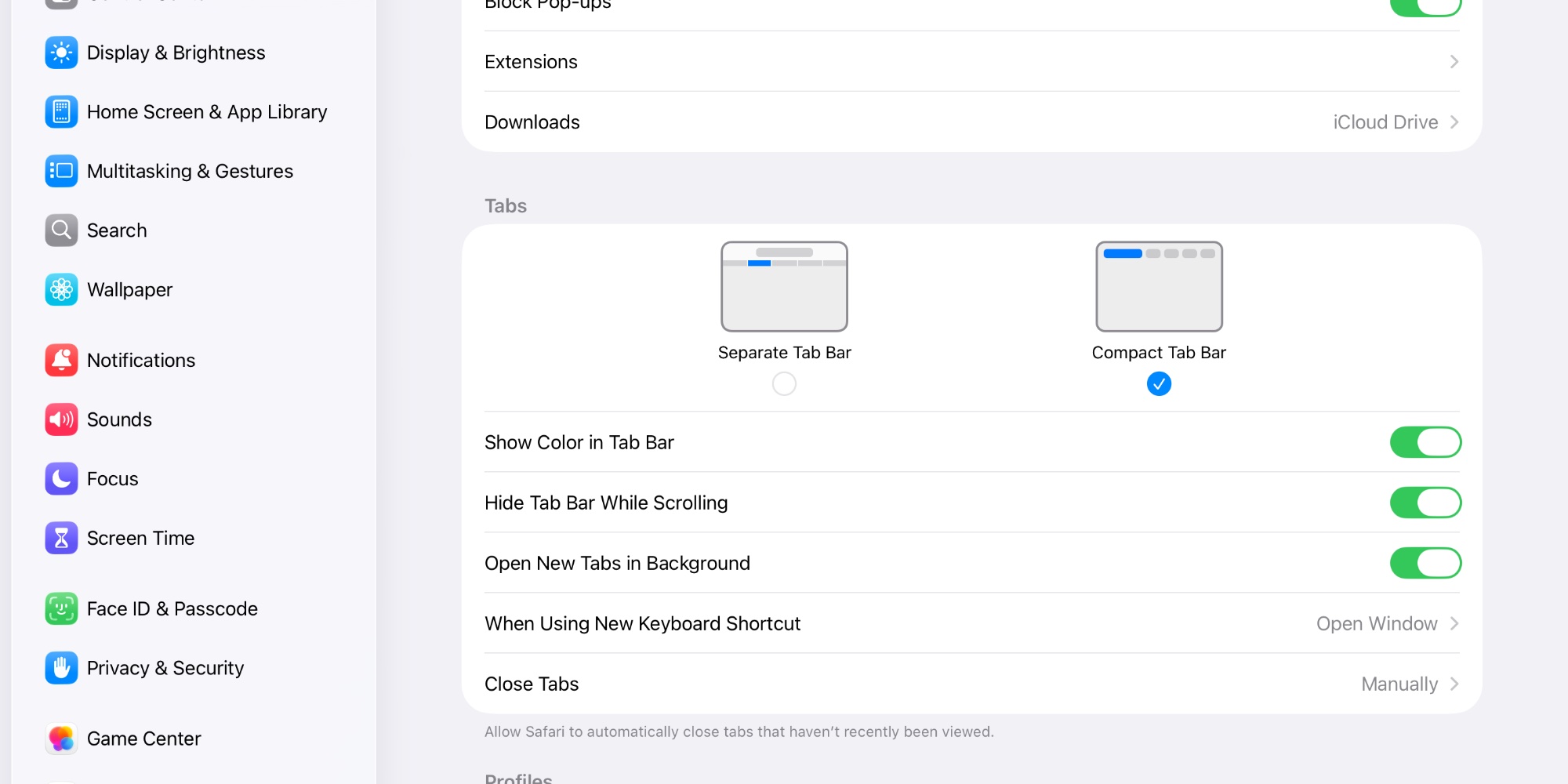
Which tab bar interface do you prefer: ‘Separate Tab Bar’ or ‘Compact Tab Bar’? I’m glad to see Apple continues to listen to its customers’ feedback. After all, Apple brought back the buttons to the iPod shuffle (4th generation) in September 2010 after Apple went too far with its smaller design for the iPod shuffle (3rd generation) that ditched all the buttons.




Lack of compact tabs is literally the no.1 reason I’ve refused the updates on my iPad mini. Better late than never, I guess.