

Apple introduced Liquid detection for their iOS devices in 2016 with iOS 10. Whenever liquid was detected in the lightning port of an iPhone, it came up with this message – “Disconnect Lightning Accessory :Liquid has been detected in the lightning connector. To protect your iPhone, disconnect this Lightning accessory and allow the connector to dry.” and had only one option – “Ignore”
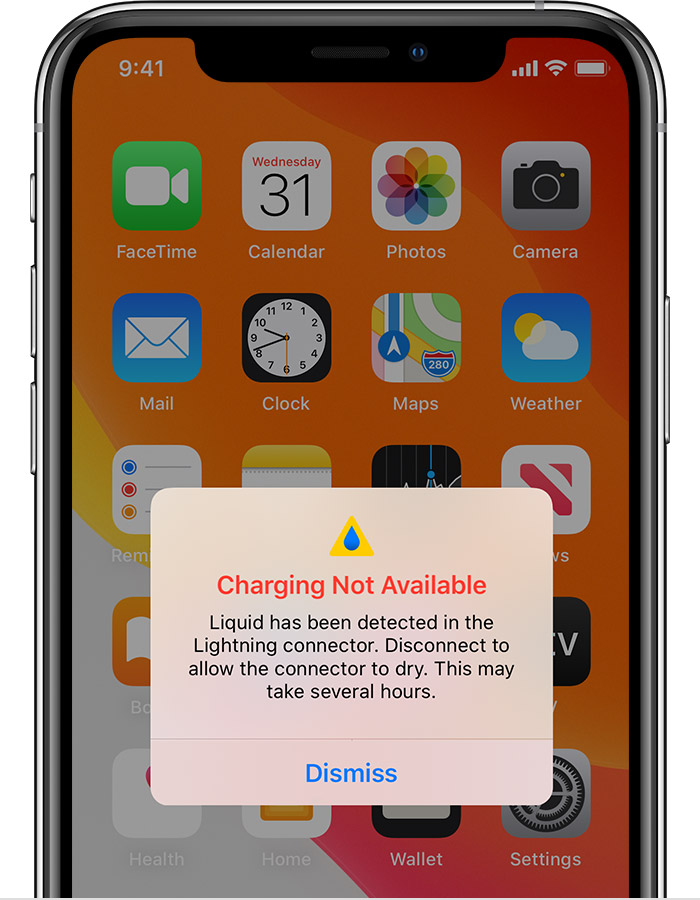
With iOS 14, Apple has added a new option called “Emergency Override” which when enabled, will allow your iPhone to charge even if liquid is detected. The popup reads: “Charging Not Available: Liquid Detected in Lightning Connector. Disconnect to allow the connector to dry. Charging now may damage your iPhone.” and has two options under it – Dismiss and Emergency Override. The Emergency Override option allows users to charge their iPhone even if it detects liquid in the lightning port. This is handy when there is a type of emergency such as a medical one where you need to quickly charge your iPhone and make a call. This was first discovered by Mark Gurman from Bloomberg.

On iOS 13, it will just show the Dismiss option.
Stay updated with the latest Apple news at Appleosophy and follow our Telegram News Channel here. Join the Appleosophy Community on Telegram here.

0 comments
No comments yet. Start a thoughtful conversation.